

How to Stay Safe on Video Chat: Privacy Tips That Actually Work
You’re about to click “start chat” on a random video platform. Your camera’s on, you’re connected, and suddenly you’re wondering—am I doing this right? Is anyone recording this? Can they find out where I live?
If you’ve ever had these thoughts, you’re not paranoid. You’re just smart.
Random video chat can be fun, spontaneous, and genuinely entertaining. But it also comes with real privacy risks that most people don’t think about until it’s too late. Whether you’re using OmeTok, Chatroulette, or any other platform, knowing how to protect yourself isn’t optional anymore.
This guide covers everything you need to know about staying safe during video chats—without killing the fun.
Why Video Chat Safety Actually Matters in 2025

Back when Omegle was still around, most people treated random chat like a digital Wild West. Anything goes, right? But after Omegle shut down in late 2023 citing safety concerns and mounting legal pressure, the conversation shifted.
Platforms got more scrutiny. Users got more cautious. And honestly, that’s a good thing.
Here’s what’s changed:
- Screen recording tools are easier to use than ever
- Location data can leak through metadata or background details
- AI tools can now reverse-search faces across social media
- Legal gray areas still exist on what’s allowed and what’s not
You don’t need to be a tech expert to stay safe. You just need to be aware.
What Most People Get Wrong About Privacy on Cam
Let’s get one thing straight: there’s no such thing as truly “anonymous” video chat if you’re not taking basic precautions. Your IP address, device type, browser fingerprint—these all leave traces.
But most privacy leaks don’t come from hackers or corporate surveillance. They come from simple mistakes.
Like showing your face, your room, your city skyline in the background, or your college hoodie with the logo front and center. That’s not a random stranger on the other side anymore. That’s someone who might know what dorm you live in.
The Biggest Safety Mistakes People Make
Here’s where things usually go wrong:
- Using your real name or social handles — even as a joke, it’s searchable
- Not covering identifiable objects — posters, street signs through windows, mail on your desk
- Clicking sketchy links — sent during chat or in platform messages
- Staying on the same chat too long — the longer you talk, the more info slips out
- Assuming the platform protects you — most don’t store logs to protect you, they do it to protect themselves legally
Every one of these is fixable. And none of them require a tech degree.
How to Set Up Your Space for Safe Video Chatting

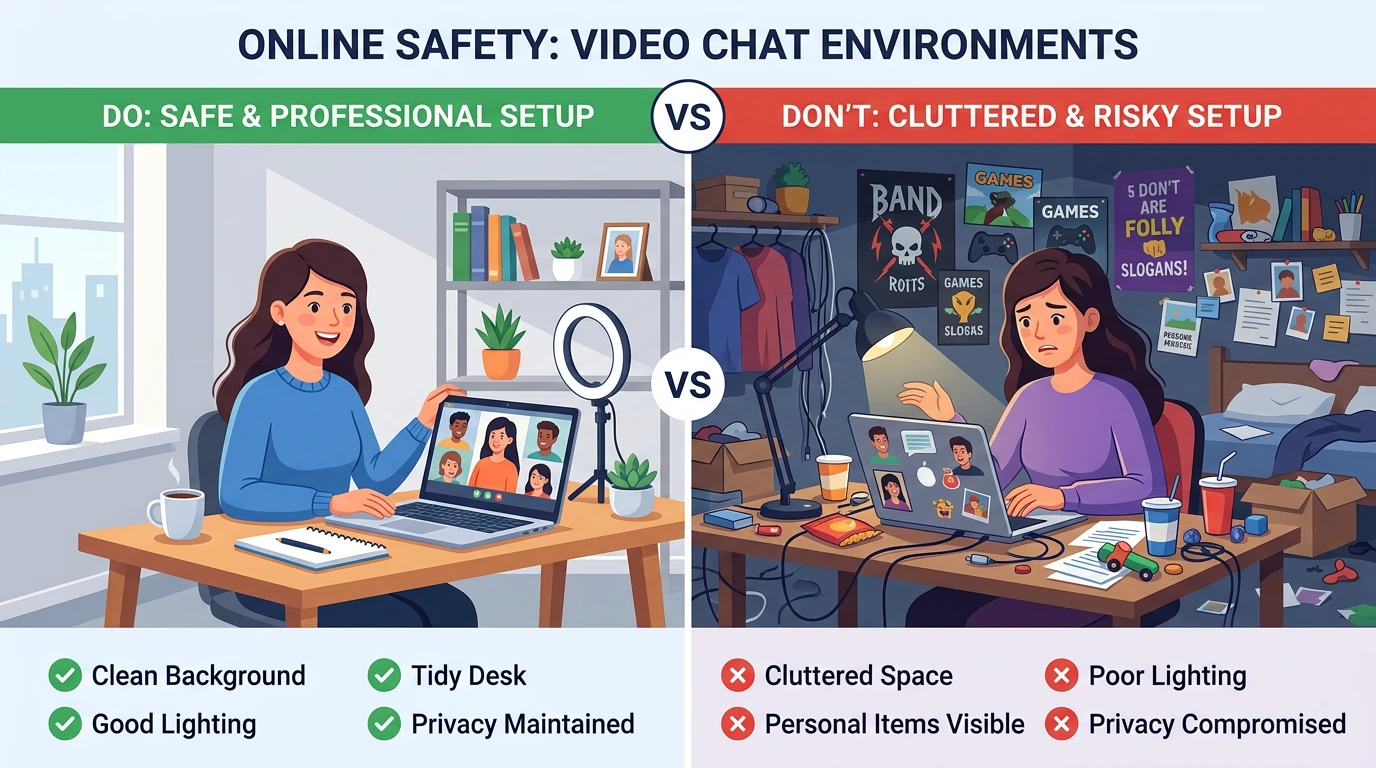
Before you even open the site, take a look around. What’s your camera seeing?
Your background says more than you think. Family photos, diplomas, delivery boxes with your address, even the books on your shelf—they all tell a story. And you might not want strangers reading it.
Neutral Backgrounds Are Your Friend
You don’t need a professional studio. Just a blank wall or a closed door. If that’s not possible, blur your background using browser extensions or built-in settings if the platform supports it.
Good lighting matters too—not for aesthetics, but because bad lighting can make you adjust your camera, and suddenly your whole room is visible.
Keep Personal Items Out of Frame
Move anything with your name, school, workplace, or location. This includes:
- ID badges
- Envelopes or packages
- Calendars with events written in
- Whiteboards with notes
- Windows showing recognizable landmarks
It sounds extreme until you realize how easy it is to piece together someone’s identity from three random clues.
Use a VPN—But Use It Right

Everyone says “use a VPN,” but let’s talk about what that actually does. A VPN masks your IP address and encrypts your connection. It won’t make you invisible, but it does make tracking you a lot harder.
Choose a reputable provider. Free VPNs often log your data or sell it, which defeats the whole purpose. According to Consumer Reports’ guide to choosing a VPN, some VPN services offer much stronger privacy practices than others, and some even sell consumer data for profit.
And no, using incognito mode isn’t the same thing. That just stops your browser from saving history locally. Your ISP and the site you’re on can still see everything.
What to Do If Something Feels Off
Trust your gut. If someone’s asking weird questions, pushing for personal info, or the vibe just feels wrong—skip. It’s one click. There’s always another chat.
Don’t feel bad about it. You don’t owe anyone your time or attention, especially if they’re making you uncomfortable.
Red Flags to Watch For
- Asking for your location within the first few messages
- Requesting you move to another app or platform
- Offering money or gifts in exchange for personal content
- Recording the screen openly (or trying to hide it)
- Aggressive behavior when you try to skip or leave
These aren’t just awkward—they’re warning signs.
Comparison: Random Chat Platforms and Their Safety Features
Not all platforms handle safety the same way. Here’s a quick breakdown of what you’re working with on the most popular options:
| Platform | Moderation | Account Required | Age Verification | Report Feature |
|---|---|---|---|---|
| OmeTok | AI + Human mods | No | Yes (18+ only) | Yes |
| Chatroulette | AI moderation | Optional | Soft gate | Yes |
| CooMeet | Manual review | Yes | Payment-based | Limited |
| Chatspin | Basic filters | No | Self-reported | Yes |
| Tinychat | Community-driven | Optional | No | Yes |
Each platform has trade-offs. More moderation usually means slower connections or account requirements. Less moderation means more freedom, but also more risk. If you’re comparing options, check out our guide to video chat sites that work on mobile.
Device and Browser Settings That Actually Help
Your safety doesn’t stop at the platform level. Your device has settings that matter too.
Disable Location Services
Most browsers will ask permission before sharing your location. Deny it. There’s no reason a random chat site needs to know your GPS coordinates.
On Chrome, Firefox, or Safari, you can block location access entirely in settings under privacy or permissions.
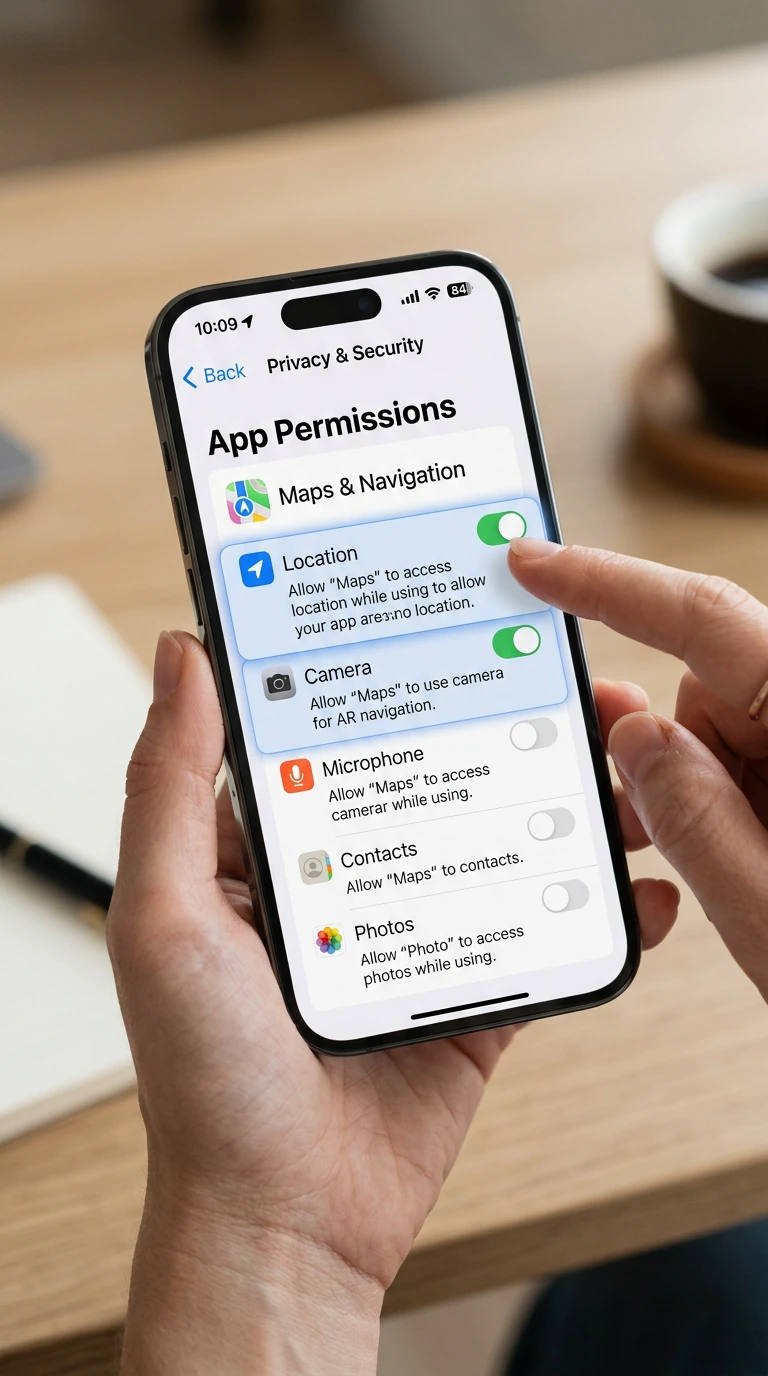
Manage Camera and Microphone Permissions
Give access only when you’re actively using the site. Revoke it when you’re done. Some sites try to keep permissions active even after you close the tab.
You can manually control this in your browser settings under “Site Permissions” or “Privacy and Security.”
Clear Cookies and Cache Regularly
Even if you’re not logged in, sites can track you through cookies. Clearing them regularly makes it harder to build a profile of your activity over time.
What Platforms Won’t Tell You About Data Collection
Here’s the uncomfortable truth: most free chat platforms make money by collecting data. That might be usage patterns, device info, rough location, or metadata from your video stream.
They don’t usually sell your face or record your chats (legally, they can’t without disclosure), but they do track enough to serve ads or analyze behavior. Research from the Electronic Frontier Foundation shows how widespread online privacy risks and tracking have become.
Read the privacy policy. It’s boring, but it’s also where they admit what they’re doing. If a site doesn’t have one, that’s a red flag on its own.
Is It Ever Really Safe?
Let’s be real—nothing online is 100% safe. But that doesn’t mean you should avoid it. It just means you should go in with your eyes open.
Random video chat is like any other part of the internet. It’s as safe as you make it. Use common sense, take basic precautions, and don’t share anything you wouldn’t want showing up somewhere else.
Platforms covered in our guide to using Omegle alternatives safely often include features like reporting, moderation, and 18+ verification to help create a safer environment. But even the best tools can’t replace personal awareness.
How to Report Problems and Protect Others
If you see something that violates the platform’s rules—someone underage, explicit content involving minors, threats, or harassment—report it. Most platforms have a flag or report button right in the chat interface.
It’s not about being a snitch. It’s about keeping the platform usable for everyone. The more people report bad actors, the harder it is for them to stick around.
What Happens After You Report
Depending on the platform, reports trigger different responses. Some use AI to auto-ban based on patterns. Others queue reports for human review. Either way, your report is usually anonymous.
Don’t expect instant results, but do expect action if the behavior is clearly against the rules.
Common Myths About Video Chat Privacy
Let’s clear up some stuff people get wrong:
- “If I don’t show my face, I’m totally anonymous.” Not true. Your voice, background, and even typing patterns can be identifying.
- “Only sketchy people use VPNs.” VPNs are standard privacy tools used by millions of people daily.
- “The platform will protect me.” Platforms provide tools, but your safety is your responsibility.
- “Incognito mode hides everything.” It hides your local browsing history. That’s it.
Advanced Tips for Privacy-Conscious Users
If you want to go the extra mile, here are some next-level moves:
- Use a separate browser or browser profile just for video chat
- Run a virtual machine if you’re really concerned about malware or tracking
- Use a burner email if the platform requires registration
- Disable WebRTC in your browser to prevent IP leaks even with a VPN
- Consider using Tor Browser for maximum anonymity (but expect slower speeds)
These aren’t necessary for everyone. But if privacy is a priority, they’re worth knowing about. For more on privacy and protection, read our Omegle leaks safety guide.
Staying Safe on Mobile vs Desktop
Mobile video chat is convenient, but it comes with extra risks. Your phone has way more sensors and permissions than your laptop—GPS, gyroscope, contact list, photo library.
Make sure you:
- Review app permissions before installing anything
- Turn off background app refresh for chat apps
- Don’t use public Wi-Fi without a VPN
- Log out and clear app data after each session
Desktop gives you more control, but mobile is fine if you’re cautious.
How to Talk About Boundaries in Chat
It’s okay to say no. It’s okay to set limits. And it’s okay to leave a chat the second someone crosses a line.
You’re not being rude. You’re being smart. Most people on these platforms are just looking for casual conversation or a little fun. But some will test how far they can push. Don’t let them.
Practice a few go-to responses:
- “I’m not comfortable with that.”
- “Let’s change the subject or I’m out.”
- “Not sharing personal info, sorry.”
Short, clear, firm. No need to explain yourself.
Frequently Asked Questions
Can someone record my video chat without me knowing?
Yes. Screen recording software is free and easy to use. Assume anything you do on camera could be recorded. That’s not meant to scare you, just to keep you aware. Don’t do or say anything you wouldn’t want saved.
Do I really need a VPN for random chat?
It’s not required, but it’s highly recommended. A VPN hides your real IP address, which makes it much harder for someone to figure out your location or ISP. For the cost and effort, it’s one of the easiest privacy upgrades you can make.
What should I do if someone threatens me during a chat?
Leave immediately. Take a screenshot if possible, then report the user to the platform. If the threat seems credible or involves blackmail, consider reporting it to local authorities. Don’t engage or try to reason with them.
Are paid platforms safer than free ones?
Not always. Paid platforms sometimes have better moderation and verification, but that’s not guaranteed. Whether free or paid, check reviews, privacy policies, and what kind of moderation they actually offer. Price doesn’t equal safety.
Is it safe to use video chat on my phone?
It can be, but you need to manage your permissions carefully. Turn off location access, don’t allow contact or photo library access unless you absolutely trust the app, and use a VPN if possible. Mobile is more vulnerable to permission creep than desktop.
Final Thoughts
Random video chat doesn’t have to be risky. With a few smart habits and the right setup, you can enjoy the spontaneity and fun without putting your privacy on the line.
Think of it like locking your door when you leave the house. You’re not paranoid—you’re just not leaving things to chance.
Whether you’re chatting on Omegle alternatives, trying out a new platform, or just killing time, these tips will help you stay in control. Because the best chats are the ones where you’re relaxed, confident, and not worried about what might happen after you click “next.”
Stay safe. Stay smart. And have fun out there.


